Viewing Gifts Received
1. From MyCompliance, click on My Requests and select Gifts Received from the drop down menu
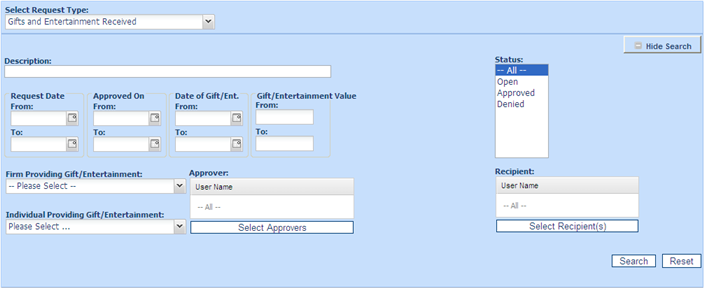
2. Select Show Search to narrow down the list, e.g. search for gifts given by employees over a certain Gift Value, search by employee who is receiving/has received the gift, i.e. the Recipient or the Requestor who is the user in your firm
requesting/has requested that the gift be accepted, or the Requestor, i.e. the outside interest donor.
3. Beside the View filters, the following options are displayed:
• All to view all gift received declarations regarding of status.
• Open to view all gift received declarations awaiting approval.
• Approved to view gift received declarations already approved.
• Denied lists those gift received declarations which have been denied.
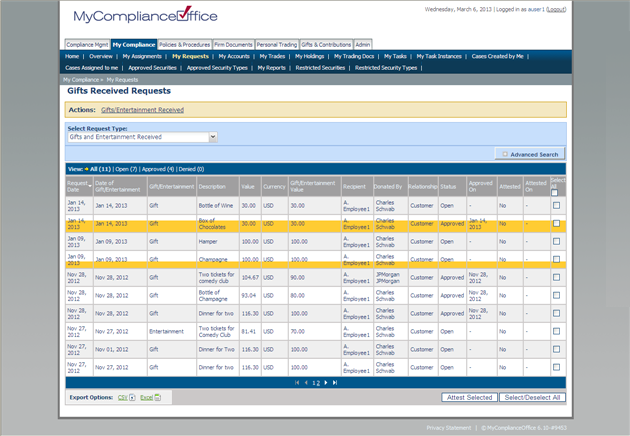
4. Gifts Received are sorted by default in order of Request Date. with the most recent one sorted first. Click any column header to change the default sort:
• Request Date – to sort by the date that the request was submitted.
• Date of Gift/Entertainment - to sort by date that the user entered on the gift form when submitted their request.
• Gift/Entertainment -type of request, Gift or Entertainment
• Description - to sort by description of the list (alphabetically).
• Value -to sort by the value or amount of the gift.
• Currency -to sort by currency.
• Gift Value -to sort by the value or amount of the gift.
• Recipient- the user in your firm requesting/has requested that the gift be accepted.
• Provider - the outside interest giving the gift/entertainment.
• Status - the gifts will be Open (awaiting approval), or Approved or Denied by the approver.
• Approved On - the date that the gift was approved or denied.
Created with the Personal Edition of HelpNDoc: Easy to use tool to create HTML Help files and Help web sites